Sunday, January 1, 2023

Algoritma dan Struktur Data Pertemuan 14

Assalamualaikum wr.wb                                                                                                                   

Nama: Muhamad Syarif Ramadhan

Nim  : 3420227001
Prodi: Teknik Informatika


Contoh 1

                                                Lampiran Contoh 1 sofware Borland C++


#include "stdio.h"       // Nama : Muhamad Syarif Ramadhan
#include <conio.h>       // NIM  : 3420227001
#include "iostream.h"
#include <iomanip.h>


float total (int jumbel, float harga) { return jumbel * harga; }
void garis () { cout<<"==============================================\n"; }
void judul () { cout<<"\tSupermarket Chumbucket"<<endl; garis(); }

//Deklarasi Struct jangan lupa diakhiti titik koma.
struct data { char kode; char nama [20]; int jml; float hrg; };

char hurufbesar (char huruf)
{
int kodeascii = (int) huruf;
if (kodeascii>=97 && kodeascii<=122) { kodeascii = kodeascii - 32; }
   return (char) kodeascii;
}

void main()
{
int i,n;
data market [10];
   float subtotal [10];
long tobay=0;

depan:
clrscr();
judul ();
cout<<"Selamat datang ditoko kami."<<endl;
cout<<"Ketentuan Belanja"<<endl;
puts("1. Jika kode A maka Nama Barang adalah Baju");
   puts("2. Jika kode B maka Nama Barang adalah Celana");
   puts("3. Jika kode C maka Nama Barang adalah Sepatu");
puts("4. Jika input kode salah maka muncul pesan salah kode");

   cout<<"Masukan Jumlah Data : "; cin>>n;

   clrscr();
judul ();
cout<<"Data Ke "<<endl;
cout<<"Kode [A/B/C] : "<<endl;
cout<<"Jumlah Beli  : "<<endl;

   for (i=1;i<=n;i++)
{
gotoxy (11,3); clreol();
gotoxy (15,4); clreol();
      gotoxy (15,5); clreol();
      gotoxy (11,3); cout<<i;
gotoxy (15,4); cin>>market[i].kode;
gotoxy (15,5); cin>>market[i].jml;

    if (market[i].kode == 'A' || market[i].kode == 'a')
{
strcpy (market [i].nama, "Baju");
market [i].hrg=20000;
}
      else if (market [i].kode == 'B' || market [i].kode == 'b')
    {
strcpy (market [i].nama, "Celana");
market [i].hrg=30000;
}
    else if (market [i].kode == 'C' || market[i].kode == 'c')
{
    strcpy (market [i].nama, "Sepatu");
market [i].hrg=40000;
}
else
{
goto salah;
    }
subtotal[i] = total (market [i].jml, market [i].hrg);
    tobay = tobay + subtotal [i];
}

   clrscr();
   judul ();
cout<<"No Kode Nama Barang Harga Jumlah Subtotal"<<endl;
garis ();
for (i=1;i<=n;i++)
{
cout<<setiosflags (ios::left)<<setw(3)<<i;
      cout<<setw (5) <<hurufbesar (market [i].kode);
cout<<setw (13) <<market [i].nama;
cout<<setw (8) <<market [i].hrg;
      cout<<setw (7) <<market [i].jml;
cout<<subtotal[i]<<endl;
}
   garis ();
long ubay, ukem;
cout<<"\t\tTotal Bayar  : "<<tobay<<endl;
cout<<"\t\tUang Bayar   : "; cin>>ubay;
ukem = ubay - tobay;
cout<<"\t\tUang Kembali : "<<ukem<<endl;
goto belakang;

salah:
cout<<"Input kode salah..!!"<<endl;
goto belakang;

belakang:
char lagi;
cout<<"Ingin input data lagi [Y/T]: "; cin>>lagi;
   if (lagi == 'y' || lagi == 'Y') { goto depan; }
   getch();
}

Contoh 2

                                                Lampiran Contoh 2 sofware Borland C++


//Contoh Class Tingkat Advance
#include <iostream.h>         // Nama : Muhamad Syarif Ramadhan
#include "stdio.h"            // NIM  : 3420227001
#include <conio.h>
#include "iomanip.h"


void garis();
void judul();
void jenis_kelamin (int kode);
void tipe_mobil (int kode);

class pelanggan
{
public:
char nmpel [20];
int jkpel;
void set_pel(char nama [20], int kelamin);
};

void pelanggan::set_pel(char nama [20], int kelamin)
{
strcpy (nmpel,nama);
jkpel = kelamin;
}

struct data
{
char merk [20];
int sewa;
long harga;
}mobil [10];

void main()
{
char nama_pet [20], kd_penyewa [5], jk_penyewa[10];
char kd_mobil[10];
int i,jml;
long subtotal [10], total=0;

   judul ();
puts ("Nama Petugas : ");
puts ("Kode Penyewa : ");
puts ("Jumlah Data  : ");

gotoxy (16,4); cin>>nama_pet;
   gotoxy (16,5); cin>>kd_penyewa;
   gotoxy (16,6); cin>>jml;

   /*Pembuatan Object Pelanggan*/
   pelanggan pel;

   if (strcmp(kd_penyewa, "PL001") == 0 || strcmp (kd_penyewa, "p1001")==0)
   {
    pel.set_pel ("Muhammad Ridwan",1);
      strcpy (kd_penyewa, "PL001");
   }
   else if (strcmp (kd_penyewa, "PL002") == 0 || strcmp(kd_penyewa, "p1002") == 0)
   {
    pel.set_pel ("NETI NURHAYATI",0);
      strcpy (kd_penyewa, "PL002");
   }
   else if (strcmp (kd_penyewa, "PL003") == 0 || strcmp(kd_penyewa, "p1003") == 0)
   {
    pel.set_pel ("ARETA VORSTEN",1);
      strcpy (kd_penyewa, "PL003");
   }

   clrscr();
   judul ();
puts ("Data Ke - ");
puts ("Kode Mobil [B/T/S]");
   puts ("Masukan Kode: ");
   puts ("Jumlah Sewa : ");

   for (i=1;i<=jml;i++)
{
gotoxy (11,4); clreol();
      gotoxy (16,6); clreol();
      gotoxy (16,7); clreol();
gotoxy (11,4); cout<<i;
gotoxy (16,6); cin>>kd_mobil[i];
gotoxy (16,7); cin>>mobil[i].sewa;

      if (kd_mobil[i] == 'B' || kd_mobil[i] == 'b')
      {
strcpy (mobil[i].merk, "BMW");
mobil[i].harga = 1000000;

}
else if (kd_mobil[i] == 'T' || kd_mobil[i] == 't')
{
strcpy (mobil [i].merk, "Toyota");
         mobil[i].harga = 850000;
}
else if (kd_mobil[i] == 'S' || kd_mobil[i] == 's')
      {
strcpy (mobil [i].merk, "Suzuki");
         mobil[i].harga = 400000;
}
      subtotal[i] = mobil[i].harga * mobil[i].sewa;
      total = total + subtotal[i];
   }

   clrscr();
cout<<"\tData Penyewaan Mobil Rental Tentacles"<<endl;
   garis();
cout<<"Nama Petugas: "<<setiosflags (ios::left)<<setw(20)<<nama_pet;
   cout<<"Kode Pelanggan : "<<kd_penyewa<<endl;
cout<<"Jumlah Data : "<<setw (20) <<jml;
cout<<"Nama Pelanggan : "<<pel.nmpel<<endl;

   if (pel.jkpel == 0)
   {
    strcpy(jk_penyewa,"Wanita");
   } else {
    strcpy(jk_penyewa,"Pria");
   }
   cout<<setw (34) <<" "; //<<setw (20);
cout<<"Jenis Kelamin  : "<<jk_penyewa<<endl;

garis ();
puts ("No  Kode  Merk Mobil   Jumlah  Harga   Subtotal");
   garis ();
for (i=1;i<=jml;i++)
{
cout<<setiosflags(ios::left)<<setw(4)<<i;
    cout<<setw(6)<<kd_mobil[i];
cout<<setw(13)<<mobil[i].merk;
cout<<setw(8)<<mobil[i].sewa;
cout<<setw(8)<<mobil[i].harga;
      cout<<subtotal[i];
cout<<endl;
}

   garis ();
long ubay, ukem;
cout<<"\t\tTotal Bayar : "<<total<<endl;
cout<<"\t\tUang Bayar  : ";cin>>ubay;
ukem = ubay - total;
cout<<"\t\tUang Kembali: "<<ukem;
getch();
}

void garis ()
{
puts ("==================================================================");
}

void judul ()
{
garis ();
puts("\t\tRental Mobil Tentacles");
garis ();
}

Terimakasih
Wassalamu'alaikum Wr. Wb.

Algoritma dan Struktur Data Pertemuan 13

 Assalamualaikum wr.wb                                                                                                                   

Nama: Muhamad Syarif Ramadhan

Nim  : 3420227001
Prodi: Teknik Informatika


Contoh 1

                                                Lampiran Contoh 1 sofware Borland C++


#include "stdio.h"      // Nama : Muhamad Syarif Ramadhan
#include <iostream.h>   // NIM  : 3420227001
#include "conio.h"


void garis ()
{

cout<<"========================================\n";
}
/*
Kelas merupakan konsep perluasan dari struct.
Seperti struct, class dapat berisi anggota data.
Kelebihan dari class adalah class juga dapat mengandung fungsi sebagai anggota.
*/

void judul ()
{
garis ();
cout<<"Program Nilai Siswa "<<endl;
garis ();
}


class siswa
{
//Penggunaan Public Pada Class
public:
char nim[15], nama [20]; float nilai;
};

void main()
{
/*
Sebuah objek adalah Instansiasi kelas.
Dalam hal ini "sisva" akan menjadi tipe data, dan "sekolah" akan menjadi variabel.
*/

siswa sekolah;
judul ();
cout<<"Nomor Induk Siswa : "; cin>>sekolah.nim;
cout<<"Input Nama Siswa  : "; cin>>sekolah.nama;
cout<<"Input Nilai Akhir : "; cin>>sekolah.nilai; clrscr();
cout<<"Data yang anda input adalah "<<endl;

garis();
cout<<"Nomor Induk Siswa : "<<sekolah.nim<<endl;
cout<<"Nama Siswa        : "<<sekolah.nama<<endl;
cout<<"Nilai Akhir       : "<<sekolah.nilai;

getch();
}

Contoh 2

                                                Lampiran Contoh 2 sofware Borland C++


#include "stdio.h"          // Nama : Muhamad Syarif Ramadhan
#include <iostream.h>       // NIM  : 3420227001
#include "conio.h"
#define pi 3.14


void garis ()
{
cout<<"==================================================\n";
}

class tabung
{
private:
int j,t;
float v,k;
public:
void masukan ();
      void keluaran ();
};

void tabung::masukan ()
{
cout<<"Program Menghitung Tabung"<<endl;
garis();
cout<<"Masukan Jari2  : "; cin>>j;
cout<<"Masukan Tinggi : "; cin>>t;

   /*
    Rumus menghitung volume tabung
    volume = ( phi x jar x jari ) x tinggi
   */
   v= (pi*j*j)*t;

   /*
    Rumus menghitung keliling tabung
    keliling = ( 2 x ( phi x jari x 2 ) + t
*/
   k=(2* (pi*j*2))+t;
garis ();
}

void tabung:: keluaran ()
{
cout<<"Volume dari tabung adalah: "; printf("%8.2f\n",v);
   cout<<"Keliling dari tabung adalah: ";printf("%8.2f\n",k);
}

void main()
{
//Create Object
tabung tabung_obj;

   tabung_obj.masukan ();
tabung_obj.keluaran ();
getch();
}

Contoh 2a

                                                Lampiran Contoh 2a sofware Borland C++


//Contoh Class              // Nama : Muhamad Syarif Ramahan
#include <iostream.h>       // NIM  : 3420227001
#include "stdio.h"
#include <conio.h>


class bujursangkar
{
int panjang, lebar;
public:
void set_nilai (int x, int y);
      int luas ()
      {
      return panjang * lebar;
      }
};

void bujursangkar::set_nilai (int x, int y)
{
//variable panjang adalah variable di dalam class bujursangkar
   panjang = x;
//variable lebar adalah variable di dalam class bujursangkar
   lebar = y;
}

void main()
{
int pjg = 10;
int lbr = 5;
bujursangkar bs;
bs.set_nilai (pjg, lbr);
cout<<"Panjang bujur sangkar adalah : "<<pjg<<endl;
cout<<"Lebar bujur sangkar adalah   : "<<lbr<<endl;
   cout<<"=============================================\n";
cout<<"Luas bujur sangkar adalah    : "<<bs.luas();
   getch();
}

Contoh 2b

                                                Lampiran Contoh 2b sofware Borland C++

//Contoh Class                  // Nama : Muhamad Syarif Ramadhan
#include <iostream.h>          //  NIM  : 3420227001
#include "stdio.h"
#include <conio.h>


class bujursangkar {
private:
int panjang, lebar;
public:
void set_nilai (int x, int y);
int luas();
};

void bujursangkar::set_nilai (int x,int y) {
panjang = x;
lebar      = y;
}

int bujursangkar::luas () {
return panjang * lebar;
}
void garis () {
cout<<"================================================\n";
}

void main() {
int pl,p2,l1,l2;
//Create Object
bujursangkar bsl;
bujursangkar bs2;
cout<<"Bujur Sangkar 1"<<endl;
garis();
cout<<"Panjang   : "; cin>>pl;
cout<<"Lebar     : "; cin>>l1;
bsl.set_nilai(pl,l1);
cout<<"Luas      : "<<bsl.luas();
cout<<endl<<endl;
cout<<"Bujur Sangkar 2"<<endl;
garis();
cout<<"Panjang   : ";cin>>p2;
cout<<"Lebar     : ";cin>>l2;
bs2.set_nilai (p2,l2);
cout<<"Luas      : "<<bs2.luas ();
getch();
}

Contoh 3

                                                Lampiran Contoh 3 sofware Borland C++

#include <iostream.h>          // Nama : Muhamad Syarif Ramadhan
#include "stdio.h"             // NIM  : 3420227001
#include <conio.h>

class bujursangkar {
int panjang,lebar;
public:
//Ini adalah prototipe konstruktor
bujursangkar (int pjg, int lbr);
int luas () {
return panjang * lebar;
      }
};

//Ini adalah bentuk lengkap konstruktor
//Nama konstruktor harus sama dengan nama kelas
bujursangkar::bujursangkar(int pjg, int lbr) {
panjang = pjg;
lebar     = lbr;
}
void main() {
int pjg  = 3;
int lbr   = 4;
cout<<"Panjang bujur sangkar adalah   :  "<<pjg<<endl;
cout<<"Lebar bujur sangkar adalah     :  "<<lbr<<endl;
cout<<"=============================================\n";

//Pemberian nilai Konstruktor dilakukan secara langsung
bujursangkar bs (pjg, lbr);

cout<<"Luas bujur sangkar adalah     :  "<<bs.luas();
getch();
}

Contoh 4

                                                Lampiran Contoh 4 sofware Borland C++

//Contoh Class
#include <iostream.h>      // Nama : Muhamad Syarif Ramadhan
#include "stdio.h"         // NIM  : 3420227001
#include <conio.h>


class mobil {
private:
char merk [30];
float cc_mesin;
long harga;
public:
//Konstruktor
mobil (char nama [30], float cc, long hrg);
//Fungsi
void keterangan ();
};

mobil::mobil(char nama [30], float cc, long hrg) {
strcpy (merk, nama);
cc_mesin = cc;
harga    = hrg;
}

void garis () {
cout<<"============================================= \n";
}

void mobil::keterangan () {
cout<<"Informasi Data Mobil"<<endl;
garis();
cout<<"Merk mobil adalah  :  "<<merk<<endl;
cout<<"CC mesin adalah     :  "<<cc_mesin<<endl;
cout<<"Harga mobil adalah :  "<<harga<<endl;
}

void main() {
mobil balap("BMW E36",2300,100000000);
balap.keterangan();
cout<<endl<<endl;
mobil matic("Mazda CX7", 2400, 634000000.);
matic.keterangan ();
getch();
}

Terimakasih
Wassalamu'alaikum Wr. Wb.


Saturday, December 24, 2022

Algoritma dan Struktur Data Pertemuan 12


Assalamualaikum wr.wb                                                                                                                   

Nama: Muhamad Syarif Ramadhan

Nim  : 3420227001
Prodi: Teknik Informatika


Contoh 1

                                                Lampiran Contoh 1 sofware Borland C++


#include "stdio.h"     //Nama : Muhamad Syarif Raadhan

#include <iostream.h>  //NIM  : 3420227001

#include "conio.h"


void garis (int a)

{

int i;

printf("\n");

for (i=1;i<=a;i++) { printf("="); }

printf("\n");

}


void main()

{

struct data

   {

char nama [15];

char nim [15];

int nilai;

   };

data mahasiswa;

cout<<"Masukan Nama   : "; cin>>mahasiswa.nama;

   cout<<"NIM            : "; cin>>mahasiswa.nim;

cout<<"Nilai Total    : "; cin>>mahasiswa.nilai;

   garis (20);

cout<<"Data Mahasiswa "<<endl;

cout<<"Nama Mahasiswa : "<<mahasiswa.nama<<endl;

   cout<<"NIM            : "<<mahasiswa.nim<<endl;

cout<<"Nilai Total    : "<<mahasiswa.nilai<<endl;

   getch();

}

Contoh 2

                                                Lampiran Contoh 2 sofware Borland C++


#include "conio.h"        //Nama : Muhamad Syarif Ramadhan
#include <stdio.h>        //NIM  : 3420227001
#include "iostream.h"
#include <iomanip.h>

#define cetak cout
#define masuk cin

void garis ()
{
cetak<<"==================================================\n";
}

void judul ()
{
garis ();
cetak<<"\tPenggunaan Struktur Dengan Array\n";
garis();
}

char hasil (int nilai);

void main()
{
/*
Sebuah struct adalah sekelompok elemen data yang dikelompokkan bersama
di bawah satu nama. Unsur-unsur data, yang dikenal sebagai anggota,
dapat memiliki berbagai jenis tipe data dan panjang yang berbeda.
*/

   judul();
   struct {
char nim[10];
      char nama [25];
char ket [20];
int nilai;
} mhs [5];
int i, jml;
cetak<<"Masukan Jumlah Data: ";masuk>>jml;
for (i=1;i<=jml;i++) {
cout<<"Data Ke - "<<i<<endl;
cout<<"Masukan NIM : "; cin>>mhs[i].nim;
    cout<<"Masukan Nama : "; cin>>mhs[i].nama;
    cout<<"Masukan Nilai : "; cin>>mhs[i].nilai;
    cetak<<endl;
if (mhs[i].nilai >= 70)
    {strcpy (mhs[i].ket, "Lulus");}
    else
    {strcpy (mhs[i].ket, "Gagal");}
}
clrscr();
judul ();
cout<<"No  Nama      NIM          Nilai     Keterangan"<<endl;
garis();
for (i=1;i<=jml;i++) {
cetak<<setw (4) <<setiosflags (ios::left)<<i;
cetak<<setw (10) <<mhs[i].nama;
cetak<<setw (13) <<mhs[i].nim;
cetak<<setw (10) <<mhs[i].nilai;
cetak<<mhs[i].ket;
cetak<<endl;
}
garis ();
getch();
}

Contoh 3

                                                Lampiran Contoh 3 sofware Borland C++


#include <stdio.h>      //Nama : Muhamad Syarif Ramadhan
#include "iostream.h"   //Nim  : 3420227001
#include <conio.h>
#include "iomanip.h"

#define cetak cout
#define masuk cin
#define enter endl


void garis () {
cetak<<"================================================\n";
}

void judul () {
cetak<<"\t\tPENITIPAN HEWAN PELIHARAAN"<<enter;
cetak<<"\t\t"; putchar (34); cetak<<"MEAOW PET CARE";putchar (44); cetak<<enter;
   garis ();
}

float tobay (float total, float subtotal);

void main() {
char nm_pet [20];
char nm_pem [20];
int i,jml;

awal:
clrscr();
judul ();
cout<<"Nama Petugas : "; cin>>nm_pet;
   cout<<"Nama Pemilik : "; cin>>nm_pem;
cout<<"Jumlah Hewan : "; cin>>jml;
clrscr();
judul();
puts("Data Ke - ");
puts ("Kode Jenis Hewan [K/H] : ");
puts ("Kode Perawatan [1/2]   : ");
   puts ("Jumlah Hewan           : ");

struct {
char kd_hewan;
char kd_rawat;
int jml_hewan;
} masukan [5];

char jenis [5][10], rawat [5][10];
float harga [5], subtotal[5];
   float total=0;

   for (i=1;i<=jml;i++) {
gotoxy (27,5); clreol();
      gotoxy (27,6); clreol();
      gotoxy (27,7); clreol();
gotoxy (11,4); cout<<i;
gotoxy (27,5); cin>>masukan[i].kd_hewan;
      gotoxy (27,6); cin>>masukan[i].kd_rawat;
gotoxy (27,7); cin>>masukan[i].jml_hewan;

if (masukan[i].kd_hewan == 'K' || masukan[i].kd_hewan == 'k') {
      strcpy (jenis[i], "Kucing");
if (masukan[i].kd_rawat == '1') {
harga[i]=250000;
strcpy(rawat[i], "Lux");
} else {
harga [i]=300000;
strcpy(rawat[i], "Intensive");
         }
} else {
strcpy(jenis[i], "Hamster");
if (masukan[i].kd_rawat == '1') {
          harga [i]=150000;
strcpy(rawat[i],"Lux");
         } else {
harga [i]=100000;
strcpy(rawat[i],"Intensive");
         }
      }

//Hitung Subtotal
      subtotal[i] = masukan[i].jml_hewan * harga[i];

    //Hitung Total
total = tobay(total, subtotal[i]);

   }

clrscr();
judul ();
printf("Nama Petugas: %s\n", nm_pet);
   printf("Nama Pemilik: %s\n", nm_pem);
garis ();
cout<<"No  Jenis    Jenis       Biaya      Jumlah  Subtotal"<<endl;
cout<<"    Hewan    Perawatan   Perawatan  Hewan"<<endl;
garis ();
for (i=1;i<=jml;i++) {
cout<<setw(4) <<setiosflags (ios::left)<<i;
cout<<setw(9) <<jenis [i];
cout<<setw(12) <<rawat [i];
cout<<setw(11) <<harga [i];
cout<<setw(8) <<masukan[i].jml_hewan;
      cout<<setprecision (10) <<subtotal[i];
cout<<endl;
   }

garis ();
float ubay, ukem;
cout<<"\t\t\tTotal Bayar  : "<<setprecision (10) <<total<<endl;
   cout<<"\t\t\tUang Bayar   : "; cin>>ubay;
ukem = ubay - total;
cout<<"\t\t\tUang Kembali : "<<setprecision (10) <<ukem<<endl; goto akhir;

akhir:
char lagi;
cout<<"\t\tINPUT DATA LAGI [Y/N]: ";cin>>lagi;
if (lagi == 'Y' || lagi == 'y') { goto awal; } else { getch(); }
}

float tobay (float total, float subtotal) {
return total + subtotal;
}

Contoh 4

                                                Lampiran Contoh 4 sofware Borland C++

#include <iostream.h>   //Nama : Muahamad Syarif Ramadhan
#include "string.h"     //NIM  : 3420227001
#include <conio.h>


struct film {
char judul [20];
char tahun [4];
} aku, kamu;

void cetakfilm (film siapa);

void main() {
strcpy(aku.judul, "One Piece");
strcpy (aku.tahun, "2000");
cout<<"Judul Film Kamu  : "; cin>>kamu.judul;
   cout<<"Masukan Tahun    : "; cin>>kamu.tahun;
   cout<<"Film favorit aku adalah  : \n";
cetakfilm (aku);
cout<<"Film favorit kamu adalah :\n";
cetakfilm (kamu);
getch();
}
void cetakfilm (film siapa) {
cout<<siapa.judul;
cout<<" ("<<siapa.tahun<<")\n";
}


Terimakasih
Wassalamu'alaikum Wr. Wb.


Algoritma dan Struktur Data Pertemuan 11

Assalamualaikum wr.wb                                                                                                                   

Nama: Muhamad Syarif Ramadhan

Nim  : 3420227001
Prodi: Teknik Informatika


Contoh 1

                                                Lampiran Contoh 1 sofware Borland C++


 /* Program Membuat Garis Menggunakan Fungsi */


#include "stdio.h"         //Nama  : Muhamad Syarif Ramadhan

#include "iostream.h"      //NIM   : 3420227001

#include "conio.h"

#include "iomanip.h"


void garis() {

    printf ("\t----------------------------------------------------\n");

}


/* Program Utama */

void main() {

   garis(); //Memanggil Fungsi Garis

   cout << "\t|\t Belajar Algoritma Dan Strutur Data. \t   |" << endl;

   garis(); //Memanggil Fungsi Garis

   int a[5];

   a[0]=9; a[1]=90; a[2]=900; a[3]=9000; a[4]=90000;

   printf ("\t| Nilai A = %d\n", a[0]);

   gotoxy (60,4); cout << "|" << endl;

   printf ("\t| Nilai B = %d\n", a[1]);

   gotoxy (60,5); cout << "|" << endl;

   printf ("\t| Nilai C = %d\n", a[2]);

   gotoxy (60,6); cout << "|" << endl;

   printf ("\t| Nilai D = %d\n", a[3]);

   gotoxy (60,7); cout << "|" << endl;

   printf ("\t| Nilai E = %d\n", a[4]);

   gotoxy (60,8); cout << "|" << endl;

   getch();

}

Contoh 2

                                                Lampiran Contoh 2 sofware Borland C++


/*

***************************************

Penggunaan Prototype Pada Fungsi

***************************************

*/

#include "stdio.h"        //Nama  : Muhamad Syarif Ramadhan

#include <conio.h>        //NIM   : 3420227001

#include "iostream.h"     

#include <iomanip.h>


//Prototype Fungsi

float total(int hrg, int jml);


void garis() {

   cout << "===================================================================================" << endl;

}


void judul() {

   garis();

   cout << "\t\t\t\t SHAFA STORE PROGRAM" << endl;

   garis();

}


void main() {

   char name[20], goods[20];

   int price, jumbel;

   judul();

   cout << " Enter the Buyer's Name : "; cin >> name;

   cout << " Name of Goods          : "; cin >> goods;

   cout << " Price                  : "; cin >> price;

   cout << " Purchase Amount        : "; cin >> jumbel;

   garis();

   cout << " Thankyou " << name << " have shopped at our store." << endl;

   cout << " What you Buy is " << goods << " with price Rp. " << price << endl;

   cout << " The Amount you Buy is " << jumbel << " so Pay is";

   printf (" Rp. %.2f", total(price, jumbel));

   cout << endl;


   getch();

}


float total (int hrg, int jml) {

   return hrg * jml;

}


Contoh 3

                                                Lampiran Contoh 3 sofware Borland C++


/* Contoh Pemanggilan Fungsi By Value */


#include "stdio.h"           //Nama  : Muhamad Syarif Ramadhan

#include "iostream.h"        //NIM   : 3420227001

#include "conio.h"

#include "iomanip.h"


void tambah(int m, int n);

void garis();


void main() {

   int a, b;

   a = 9; b = 2;

   garis();

   cout << "\t||    Nilai Variable sebelum Fungsi digunakan" << endl;

   gotoxy (58,2); cout << "||" << endl;

   cout << "\t||    Nilai A adalah " << a << " Nilai B adalah " << b << endl;

   gotoxy (58,3); cout << "||" << endl;

   garis();

   // Pemanggilan Fungsi Tambah

   tambah (a, b);

   garis();

   cout << "\t||    Nilai Variable setelah Fungsi digunakan" << endl;

   gotoxy (58,8); cout << "||" << endl;

   cout << "\t||    Nilai A adalah " << a << " Nilai B adalah " << b << endl;

   gotoxy (58,9); cout << "||" << endl;


   getch();

}


void tambah(int m, int n){

   m += 3; n += 8;

   cout << "\t||    Nilai di dalam Fungsi Tambah." << endl;

   gotoxy (58,5); cout << "||" << endl;

   cout << "\t||    Nilai M adalah " << m << " Nilai N adalah " << n << endl;

   gotoxy (58,6); cout << "||" << endl;

}


void garis() {

   cout << "\t===================================================\n";

}


Contoh 4

                                                Lampiran Contoh 4 sofware Borland C++
/* Contoh Pemanggilan Fungsi By Reference */

#include "stdio.h"          //Nama  : Muhamad Syarif Ramadhan
#include "iostream.h"       //NIM   : 3420227001
#include "conio.h"
#include "iomanip.h"

void tambah(int *m, int *n);
void garis();

void main() {
   int a, b;
   a = 3; b = 5;
   garis();
   cout << "\t||  Nilai Variable sebelum Fungsi digunakan" << endl;
   gotoxy (70,2); cout << "||" << endl;
   cout << "\t||  Nilai A adalah " << a << " dan Nilai B adalah " << b << endl;
   gotoxy (70,3); cout << "||" << endl;
   garis();
   /*
    Pemanggilan Fungsi Tambah
    Nilai yang masuk ke Fungsi tambah bukan nilai dari Variable a dan b
    tetapi Alamat dari Variable a dan b
   */
   tambah (&a, &b);
   garis();
   cout << "\t||  Nilai Variable setelah Fungsi digunakan" << endl;
   gotoxy (70,8); cout << "||" << endl;
   cout << "\t||  Nilai A adalah " << a << " dan Nilai B adalah " << b << endl;
   gotoxy (70,9); cout << "||" << endl;

   getch();
}

void tambah(int *m, int *n){
   /*
      Nilai yang ada di Alamat m di tambah 5
      Hal ini akan merubah Nilai Variable a karena Variable a ada di alamat m
   */
   *m = *m + 5;
   /*
      Nilai yang ada di Alamat n di tambah 7
      Hal ini akan merubah Nilai Variable b karena Variable b ada di alamat n
   */
   *n += 7;
   cout << "\t||  Nilai di dalam Fungsi Tambah." << endl;
   gotoxy (70,5); cout << "||" << endl;
   cout << "\t||  Nilai M adalah " << m << " dan Nilai N adalah " << n << endl;
   gotoxy (70,6); cout << "||" << endl;
}

void garis() {
   cout << "\t===============================================================\n";
}

Terimakasih
Wassalamu'alaikum Wr. Wb.


Algoritma dan Struktur Data Pertemuan 10

  Assalamualaikum wr.wb                                                                                                                   

Nama: Muhamad Syarif Ramadhan

Nim  : 3420227001
Prodi: Teknik Informatika


Contoh 1

                                                Lampiran Contoh 1 sofware Borland C++

#include <conio.h>         // Nama  : Muhamad Syarif Ramadahan
#include "stdio.h"           // NIM   : 3420227001
#include <iostream.h>
#include "iomanip.h"

//Deklarasi Define
#define A 9
//Tidak perlu diakhiri dengan ; karena bukan pernyataan
#define B 2

void main() {
  int result;


  cout << "\t = = = = = = = = = = = = = = = = =" << endl;
  printf ("\t | Nilai dari A adalah     : %d\n", A);
  printf ("\t | Nilai dari B adalah     : %d\n", B);
  gotoxy (41,2); cout << " |" << endl;
  gotoxy (41,3); cout << " |" << endl;
  cout << "\t = = = = = = = = = = = = = = = = =" << endl;
  result = A * B;
  printf ("\t | Nilai dari A * B adalah : %d\n", result);
  gotoxy (41,5); cout << " |" << endl;
  cout << "\t = = = = = = = = = = = = = = = = =" << endl;

  getch();
}


Contoh 2

                                                                         Lampiran Contoh 2 sofware Borland C++


#include "conio.h"            // Nama  : Muhamad Syarif Ramadhan
#include <iostream.h>      // NIM   : 3420227001
#include "iomanip.h"

#define krwlbk {
#define krwltp }
#define exit cout
#define enter cin
#define hold getch()

void main ()
krwlbk
    int a, i=9;
    int nilai [9];
    exit << "\t|   Contoh Penggunaan #Define   |" << endl;
    cout << "\t= = = = = = = = = = = = = = = = =" << endl;
    for (a=0;a<i;a++)
    krwlbk
    exit << "\t| Masukan Nilai ke " << a << " -> "; enter >> nilai[a];
    gotoxy (41,3+a); exit << "|" << endl;
    krwltp

    cout << "\t= = = = = = = = = = = = = = = = =" << endl;
    exit << "\t|          Hasil Input          |" << endl;
    cout << "\t= = = = = = = = = = = = = = = = =" << endl;
    for (a=0;a<i;a++)
    {
       exit << "\t| Nilai ke " << a << " adalah " << nilai[a] << endl;
       gotoxy (41,15+a); exit << "|" << endl;
    }

   hold;
krwltp

Contoh 3


                                              Lampiran Contoh 3 file 'tampil.h' sofware Borland C++

#define output cout
#define key() main()
#define view printf
#define write puts
#define enter scanf
#define input cin
#define take gets
#define eraser() clrscr()
#define in if
#define except else
#define holdon getche()


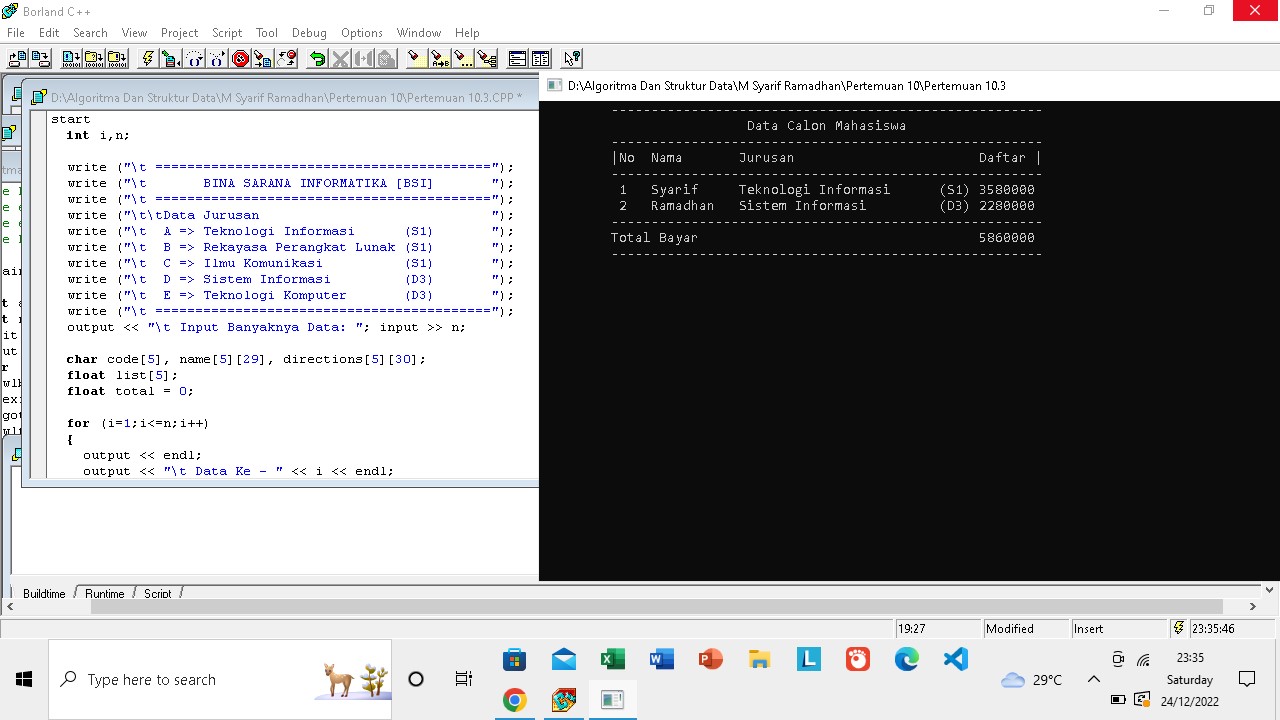
                                                               Lampiran Contoh 3  sofware Borland C++


#include "stdio.h"       // Nama  : Muhamad Syarif Ramadhan
#include <iomanip.h>     // NIM   : 3420227001
#include "tampil.h"
#include <conio.h>
#include "iostream.h"

/*
    Dalam penulisan #include ada dua bentuk penulisan :
    #include *nama_file_header" atau #include <nama_file_header>
*/

void key()
start
  int i,n;

  write ("\t ==========================================");
  write ("\t       BINA SARANA INFORMATIKA [BSI]       ");
  write ("\t ==========================================");
  write ("\t\tData Jurusan                             ");
  write ("\t  A => Teknologi Informasi      (S1)       ");
  write ("\t  B => Rekayasa Perangkat Lunak (S1)       ");
  write ("\t  C => Ilmu Komunikasi          (S1)       ");
  write ("\t  D => Sistem Informasi         (D3)       ");
  write ("\t  E => Teknologi Komputer       (D3)       ");
  write ("\t ==========================================");
  output << "\t Input Banyaknya Data: "; input >> n;

  char code[5], name[5][29], directions[5][30];
  float list[5];
  float total = 0;

  for (i=1;i<=n;i++)
  {
    output << endl;
    output << "\t Data Ke - " << i << endl;
    view ("\t Masukan Nama : ");take(name[i]);
    view ("\t Kode Jurusan : ");input>>code[i];

    in (code[i]=='A'||code[i]=='a')
    {
        strcpy (directions[i], "Teknologi Informasi      (S1)");
        list[i] = 3580000;
    }
    except in (code[i]=='B'||code[i]=='b')
    {
strcpy (directions[i], "Rekayasa Perangkat Lunak (S1)");
list[i] = 3080000;
    }
    except in (code[i]=='C'||code[i]=='c')
    {
strcpy (directions[i], "Ilmu Komunikasi          (S1)");
list[i] = 2580000;
    }
    except in (code[i]=='D'||code[i]=='d')
    {
      strcpy (directions[i], "Sistem Informasi         (D3)");
        list[i] = 2280000;
    }
    except in (code[i]=='E'||code[i]=='e')
    {
strcpy (directions[i], "Teknologi Komputer       (D3)");
list[i] = 1980000;
    }
    except
    {
      strcpy (directions[i], "-");
        list[i] = 0;
    }
    total = total + list[i];
  }
  /*
    #include "nama_file_header"
    Pertama kali compiler akan mencari file header yang disebutkan pada direstori
    yang sedang aktif dan apa bila tidak ditemukan akan mencari pada directori
    dimana file header berada.
  */

  eraser();
  output << "\t ----------------------------------------------------" << endl;
  write    ("\t                  Data Calon Mahasiswa               ");
  output << "\t ----------------------------------------------------" << endl;
  write    ("\t No  Nama       Jurusan                       Daftar ");
  output << "\t ----------------------------------------------------" << endl;
  for(i=1;i<=n;i++)
  {
    output << "\t  " << setw(4) << setiosflags(ios::left) << i;
    output << setw(11) << name[i];
    output << setw(29) << directions[i] << " ";
    output << setprecision(8) << list[i];
    output << endl;
  }
  output << "\t ------------------------------------------------------" << endl;
  output << "\t " << setw(46) << "Total Bayar";
  output << total << endl;
  output << "\t ------------------------------------------------------" << endl;
  getch();
  /*
    #include <nama_file_header>
    Compiler hanya akan mencari file header yang disebutkan pada directori
    dimana file header berada.
   */
end


                                                Sekian dan Terimakasih
                                             Wassalamualaikum wr.wb